Thursday, January 12, 2017

New Exercise Apps for the New Year


I've reviewed quite a few exercise apps, if you would like to read some of those previous articles see below, but I thought with a new year a lot of people decide to exercise to lose weight or just be healthier. I will review some new exercise apps that are free, but if you don't mind paying a little, take a look at my source articles for some additional Premium apps.


AllTrails (Free, $29.99/yr.) iOS and Android - This app and website provides maps for backpacking, hiking, or cycling or perhaps just to take your pet on a walk somewhere new. Find new trails to experience, read reviews, and get helpful information. Users can upload pictures or record their journey to share with others. If users wish to download maps for offline use or create custom maps it will cost $29.99 a year.


 Cyclemeter (Free, $9.99/yr Elite ) iOS only - The app works like a very advanced cycle computer. It logs distance, calories, elevation, and much more. Users can view speed and ride information or have a map displayed for navigation. There are a ton of features if you pay for the "Elite" membership but for casual cyclists the free version may be enough.


Daily Workouts Free (Free) iOS, Android, Windows, Amazon - Free users get a limited selection of timed exercise videos (that users follow along with) for different muscle groups, and it's enough for most people. The app keeps track of the number of time you do each set of exercises, do enough and users unlock more videos. The app has pop-up and banner ads. A one time fee of $9.99 unlocks all of the other how to videos and eliminates ads.


Google Fit (Free) Android or web - The web version is just an exercise log but the Android app uses your phone or fitness tracker to give users all kinds of charts, graphs, and statistics. See all your food and exercise tracking in one place.

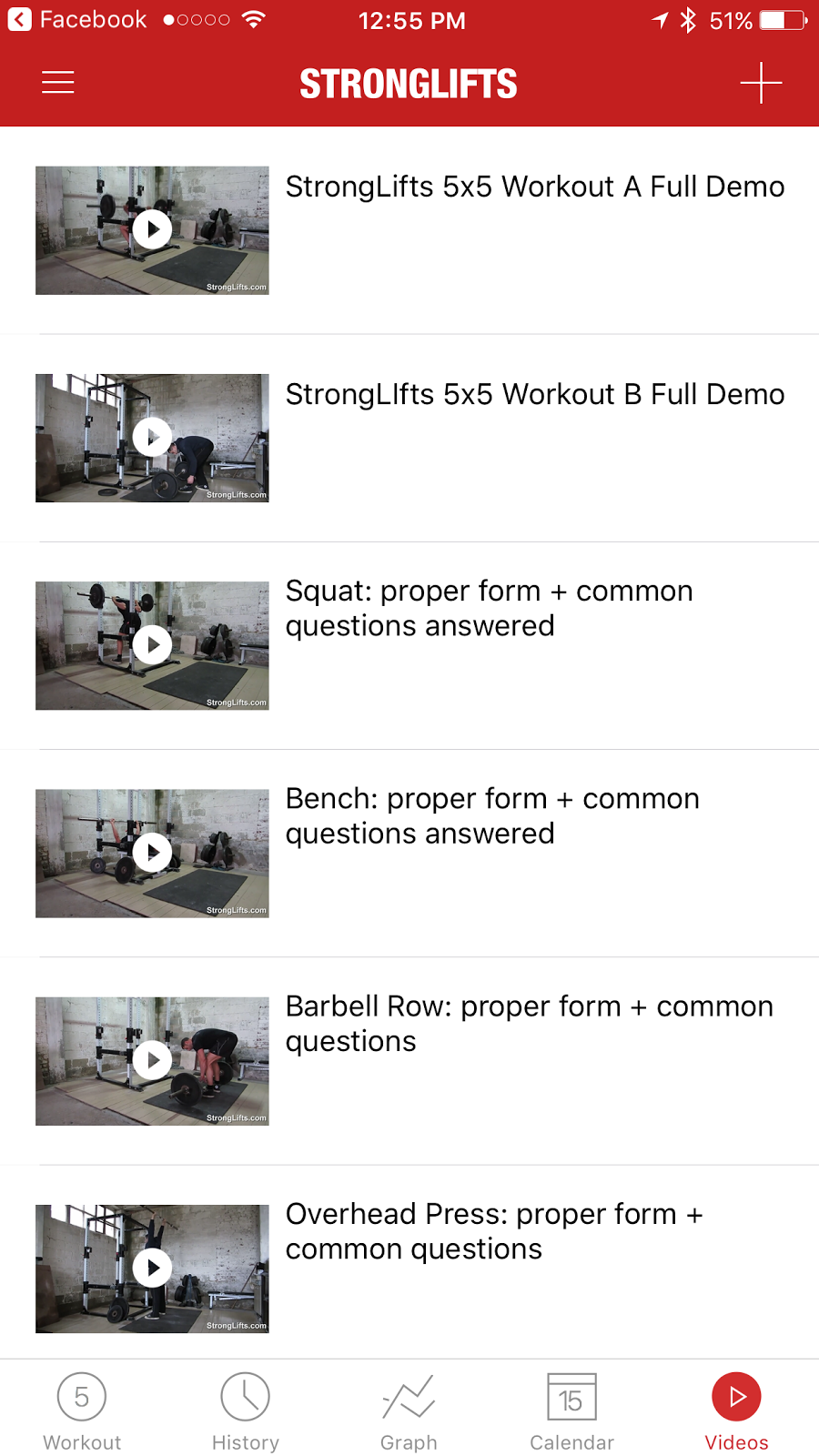


 StrongLifts 5x5 (Free, $9.99 Premium) iOS and Android - If users are looking to learn some strength training / weight lifting exercises this app provides how to videos, a plan, and tracking. For a one time fee of $9.99 the app provides a variety of extra features but they aren't necessary. Easy to use interface, with everything users need and nothing extra.

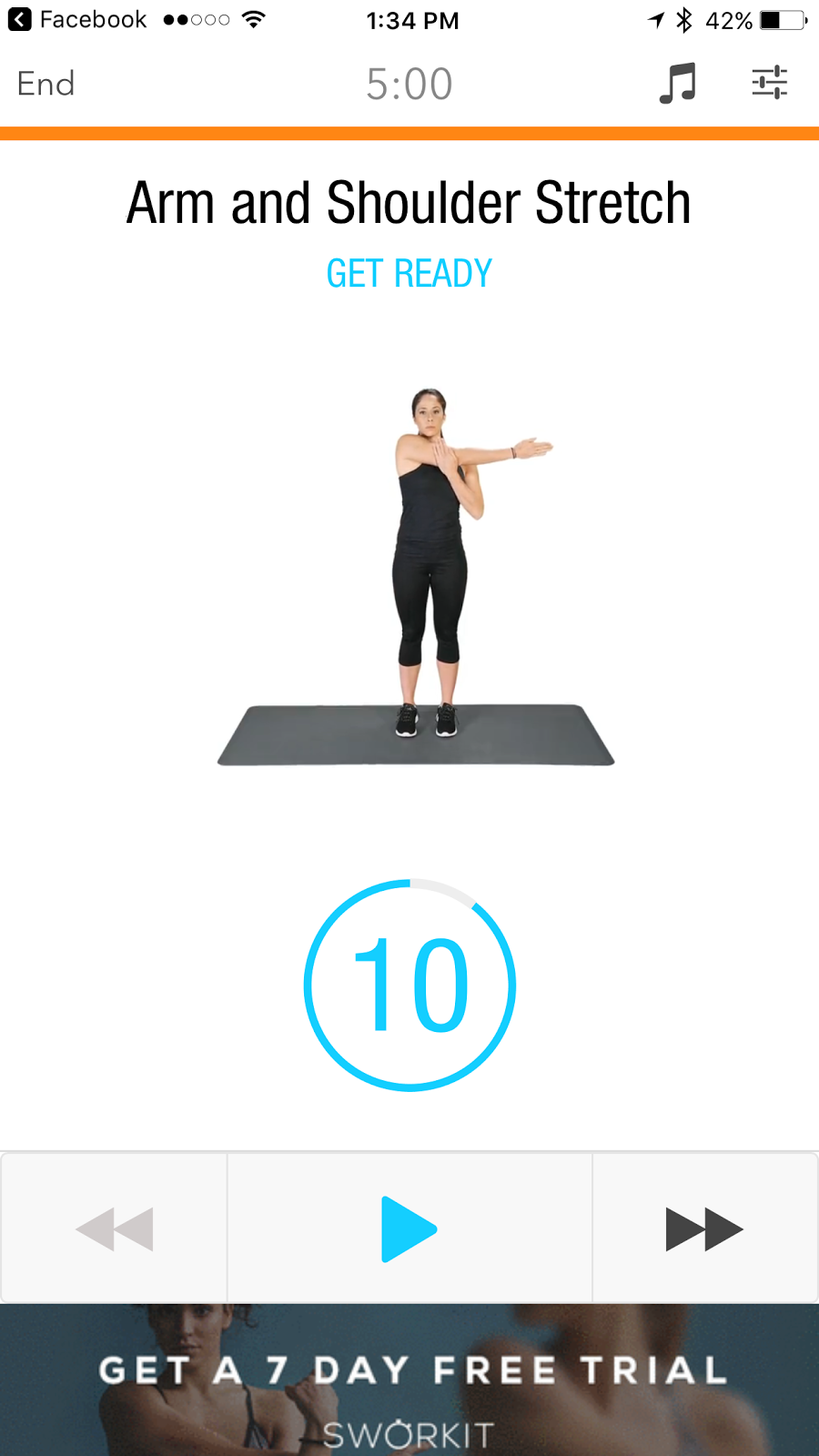


Sworkit (Free) iOS and Android - A daily work out app where the user follows along. It has a nicer user interface than Daily Workouts but less exercises. The app pushes its subscription services through banner ads, locked workouts, and pop up add after you finish a workout. One of the apps strengths is that it has some stretching and yoga exercises


 30 Day Fit Challenge Workout (Free) iOS and Android - Similar to those 30 Day Challenge charts that you might see on social media users start with a small number of a single exercise (or multiple exercises) and build up day by day to meet a designated number (or duration) by the end of 30 days. The user interface is pleasant and there are some nice features that the app provides for free: notifications, BMI (body mass index) calculation, and weight tracking. There are small unobtrusive banner ads at the bottom of the screen.  


 VeloPal (Free, $5.99/mo. or $39.99/yr. Elite) - Much like Cyclemeter the app is like a cycling computer. Made in collaboration with Garmin it is meant to work with fitness trackers and cycling sensors. The display is functional, easy to read, and the user interface easy to navigate. It just seems bland compared to Cyclemeter for basic users, but seems like it is more directed at dedicated cyclists. For most users the free app is enough but there are some nice features for Elite subscribers such as activity exporting and advanced ride analysis.


 Workout Trainer (Free, $6.99/mo. Pro) - Very similar to Daily Workouts and Sworkit this app has exercise videos where users follow along. I liked how easy it is to use the step by step menu to select the type of exercise, the length, and level of difficulty. The user interface is extremely easy to navigate. There are lot of interesting features such as exercise tracking, reminders, community, and trainers you can follow (to get tips from). There is a good variety of free exercises but if you want to unlock all the premium features it costs $6.99 a month.


Sources:

Best fitness apps: 7 iPhone and Android apps to get you fit while having fun in 2017 http://www.dailystar.co.uk/tech/news/574708/Best-fitness-apps-2017-for-iPhone-and-Android


Thursday, January 5, 2017

Comparing Music Streaming Services


I have spent the last nine months taking turns subscribing to and trying each of the five most popular music subscription services. I must say that I was pleasantly surprised at how easy it was to cancel service with each of them. I tried to condense them down into bullet points of what each did well (+) and what each did poorly (-) or not at all. The name of each service is a link to their website where you can learn more and subscribe. Below these summaries I will give a quick take away about each music service.


Apple Music {$9.99 monthly; $14.99/mo. up to six users}
+ Some exclusive content
+ Integrates with iTunes Library
+ Great suggestions if you are a long-term iTunes user
- App user interface
- System generated playlists
- Classical music variety
- Podcast integration
- No web interface
- Creating playlists / managing content
- Radio Stations

> I found the minimal user interface difficult to figure out making playlists, settings, and certain navigation. There are a lack of features and I was surprised that they lack a variety of classical music offerings. From what I have heard if you have all your music in iTunes and use Apple products a lot the experience gets better with time. 


Google Play Music {$9.99 monthly; $14.99/mo. up to six users} 
+ App user interface
+ Integrates your music library
+ System generated playlists
+ Radio Stations
+ Podcast integration
+ Music suggestions
+ Web interface
+ Classical Music variety
+ Creating playlists / managing content
+ Video content available
- No exclusive content

> I like the user interface and the suggested playlists, although for some reason the web player lacks a pause button. There is good variety in classical music and I was surprised at the variety of holiday playlists. Google uses their predictive analytics well in suggesting music you would like. 


Microsoft Groove Music Pass {$9.99 monthly}
+ Creating playlists / managing content
+ Classical Music Selection
- App user interface
- Integrates your music library
- No podcast integration
- System generated playlists
- Radio Stations
- No web interface
- Unreliable (had periods where it simply did not work)
- No exclusive content

> I had the worst experience with this service because it was unreliable, there were times where it would just say "Service Unavailable at this time". The user interface is minimal but easier to navigate than Apple Music. There is a good variety of classical. The radio stations and suggested playlists were horrible.


Spotify {$9.99 monthly; $14.99/mo. up to five users}
+ App user interface
+ Integrates your music library
+ Radio Stations
+ System generated playlists
+ Socially share playlists / connect with friends
+ Special Features (special play modes)
+ Exclusive Content
+ Available on almost any device
+ Podcast integration
+ Create playlists / manage content
- No web interface

> I found this service to be the best at finding new music that I would like, see what my friends are listening to, share playlists, get radio stations, and find new podcasts . Spotify has been developing exclusive content from a wide range of artists, some of which I enjoy listening to. They have several running features that match the beats with your pace which is really helpful. The only thing that is disappointing is the lack of a web player means it is difficult to listen when you are on a computer where you cannot install a program.


Tidal {$9.99 monthly standard; $14.98/mo. for two people; $19.99 Hi-Fi monthly}
+ High quality audio
+ Exclusive content
+ Special features (especially in audio settings)
+ System generated playlists
+ Radio Stations
+ Create playlists / manage content
+ Integrates your music library
+ App user interface
+ Web interface
+ Video content available
- No podcast integration
- Lack of classical music and depth in certain genres

> If you are an audiophile or you are a fan of hip hop, Tidal is the best choice. They have exclusive content by a host of hip hop stars and new pop talent. They have an gorgeous user interface and a lot of settings for people who like to customize their audio playback. I found the suggested playlists and radio stations did not meet my needs and the classical music was almost non-existent.

Sources:


Tidal Try-Us-Now http://tidal.com/us/try-now


Tuesday, December 27, 2016

Mesh Networks: AmpliFi HD, Eero, Google Wi-Fi, Luma, Orbi, Plume

With the continuous development of the connected home, more and more smart devices need to be connected to the Web. Homes with multiple floors, certain building materials, or a difficult layout may make for dead zones or other problems connecting. A typical home router may be enough to cover certain homes but they lack the device management, timely security updates, and a variety of other options like guest networks. Technology companies created a new set of devices called "mesh networks" that usually consist of a main unit which connects to a user's Internet modem and satellite units that rebroadcast the signal throughout the home. Previously there Wi-Fi routers and range extenders that did a similar task but these frequently did a poor job and required a certain level of technology expertise to set-up and maintain. Mesh networks created systems that use multiple radio frequencies and an easy-to-use app to make easy to use systems. Two of the big advantages for users are the automatic security updates, device management (think restricting what your child's devices can access and when), and guest networks (which allow visitors to connect without a password).

After reading through multiple articles about these mesh networks I've come to the conclusion that the speed difference is small and depending on how the test is done different mesh networks come out on top. Each mesh network has it's strengths (+) and weaknesses (-) . {The name of each device takes you to the product's website} The reviews and background information I read to come to these conclusions are below, if you want to read more in-depth.


AmpliFi HD: [$130 base, $350 kit]
+ Set-Up
+ App
+ Advanced Settings
+ Range
+ / - Ethernet ports (four on main and none on satellites)
- No Quality of Service (explanation)
- Hardware design


Eero : [$187 one unit, $396 three]
+ Set-Up
+ App
+ Quality of Service (explanation)
+ Hardware design 
+ Auto Updates
- Ethernet ports
- Price
- Device Management


Google Wi-Fi: [$129 one unit, $299 three]
+ Set-up
+ App
+ Auto Update
+ Price
+ Internet of Things Integration
+ Device Management
+ Hardware design
- No Quality of Service
- Ethernet ports
- Satellite performance


Luma [$149 one unit, $349 three]
+ App
+ Automatic Updates
+ Parental Controls / device management
+ Hardware design
- Set-Up 
- No Quality of Service
- Range
- Price


Orbi: [$250 one unit, $380 two, $570 three]
+ Ethernet ports
+ Best coverage range
+ Radios and Streams (explanation)
+ Virtual Private Network support
+ Possible future USB support
- Hardware design
- No Quality of Service
- Set-up issues
- Poor app, relies on web interface
- Lacks auto updates


Plume [$69 one unit, $179 three, $329 six]
+ Radio streams
+ Load balancing (adaptive technology)
+ Set-Up
+ Coverage
+ Lowest cost per unit
+ Auto Updates
- Apple device only app
- Parental Control
- No Quality of Service 


What if coverage isn't the issue (less than 2000 sq ft, single story, well positioned router*^), you're looking for better security and quality basic features, multiple websites cite the TP-Link Archer C7 Wireless Dual Band Gigabit Router (AC1750) as a best buy [approximately $87].


 If users want an app, parental controls, quality of service, security, and much more NETGEAR AC1750 Smart WiFi Router Dual Core 800MHz is the router for you [approximately $117]. 


Sources:

I tried Google Wifi, Eero, and Orbi — Here's Which One You Should Buy http://www.businessinsider.com/google-wifi-vs-eero-vs-orbi-mesh-wifi-showdown-2016-12

Google WiFi Goes Head-to-Head With Eero and Luma in Speed Teshttp://www.droid-life.com/2016/11/21/google-wifi-vs-eero-vs-luma-fastest/


Google WiFi Goes Head-to-Head With Eero and Luma in Speed Test http://www.droid-life.com/2016/11/21/google-wifi-vs-eero-vs-luma-fastest/


The Best Wi-Fi Mesh Network Kits for Most People http://thewirecutter.com/reviews/best-wi-fi-mesh-networking-kits/


Hands-on: Ubiquiti’s Amplifi covers the whole house in a Wi-Fi Mesh http://arstechnica.com/gadgets/2016/07/spending-some-time-with-ubiquiti-labs-amplifi-home-wi-fi-mesh-system/

These 3 Mesh Routers Will Boost your Home Wi-Fi Signal and Kill those Pesky Dead Zones https://ideaing.com/ideas/luma-eero-orbi-wifi-mesh-router-comparison

*Google Wifi vs. Eero vs. Luma: Which Mesh-Network Router Is Right for You? http://nymag.com/selectall/2016/12/google-wifi-eero-luma-comparison-test.html

^The Best Wi-Fi Router (for most people) http://thewirecutter.com/reviews/best-wi-fi-router/


Put one of these Plume pods in each room to blanket your home in Wi-Fi https://www.cnet.com/products/plume-adaptive-wifi-system/preview/

Thursday, December 22, 2016

Best Apps of 2016

I decided that I would limit my list this year to free apps and not include game apps. There are some apps that I left off the list because they seemed too niche for most people; the kind of app users only need in a certain situation and then delete it later; and apps that have had major issues in the last year (crashes, data loss, questionable future). I tried to give the main reason the app is on the list and eliminated any app that is not available on both Android and Apple phones. Doing all of that is tough, there are some great apps that are perfect for really specialized tasks or are available but only for Android, iPhone, or they cost money. If I forgot one of your favorite apps or you think... why isn't this on the list! Please let me know.

I linked the name of the app to it's website where the developer usually explains the app, has tutorials, and links to the app's download link for each platform. If they don't have a website (or the website does not link to the app downloads) I added the links to their spot in the App Store (iOS) and Google Play Store (Android). One of the issues with apps is that many apps do not work on all versions of the operating system. If you have an older phone you may find that less and less apps are able to be used on your device. I see this happen more with Android apps but it can also be true of older Apple devices. In some cases users can "side load" an app but it may not work correctly and it does take some more advanced technical skill.

Outlook - great calendar and e-mail integration

Gmail - (iOS and Android) upgraded user interface and graphics make it even better     

ProtonMail - encrypted e-mail that allows multiple security features

Facebook - (iOS and Android) Live video, groups, and almost everyone you know

Instagram - (iOS and Android) adopting some video features,updating the interface, and cutting down spam makes it better

SnapChat - it's where everyone under 30 is, group chats added, and users can save their snaps

LastPass - one of the best password managers is now free on mobile, plus interface upgrades
Chrome - (iOS and Android) one of the best mobile browsers improved the amount of memory it uses

Opera Mini (iOS and Android) - the fastest light weight browser with the best privacy features

Waze - a navigation app that gives users traffic and location information, and remembers where you parked

Google Maps - (iOS and Android) the information it can provide about locations on top of its navigation keep it great

Opera VPN - a free Virtual Private Network can come in handy on free Wi-Fi, easy to use

(Facebook) Messenger - video messaging (now includes groups), stickers, and encryption if you want it.

Signal - the best messaging app for the privacy minded, full encryption

MyFitnessPal - (iOS and Android) user interface upgrades
and added features

SwiftKey - a great keyboard that learns how you type and the remembers things you frequently type

Gboard - (iOS and Android) best keyboard if you're a frequent emoji user

Spotify - the best at suggesting new music and playlists, ease of use, and developing exclusive content

Netflix - improved interface, download option, and new exclusive content

YouTube - (iOS and Android) Video content that runs a wide
spectrum. For the younger generation it is indispensable.

Prisma - turns your photos into art and adds new modes frequently

Google Photos - (iOS and Android) save your photos and your devices space, users can edit photos, make videos, and more

PicsArt - Lots of photo editing options, fun stickers, make a meme

Photoshop Fix - the Photoshop features most people use

YouCam Perfect - the ultimate selfie app with all kinds of photo editing features specific to creating the perfect selfie

OverDrive - when it comes to library eBooks, it's the best available

Hoopla - music and videos available from your library

Duolingo - learn a language, their new chat bot helps with conversational language

Pocket - save articles and find new things to read, easy to use interface, multiplatform

Nuzzel - (iOS and Android) find articles through social media connections and the "discover" feature, create your own newsletter based on what you are interested in, reccomend, or read.

CamScanner - scan documents, send them as pictures or PDF, easy to use

Heirloom - scan old photos and share them with family or friends

Yummly - (iOS and Android) find and share recipes easily

Evernote - (iOS and Android) still the best productivity app user interface-wise

Google Keep - (iOS and Android) best productivity app storage-wise

Google Hangouts - (iOS and Android) best video chat app, works with pretty much every device

Fitocracy - learn new workouts, get plans based on your goals, share your progress

My Asics Running Coach - running plans for every distance and adjusts based on your schedule and goals 

Nike+ Run Club - user interface upgrades, additional features, running community, better Apple Watch integration

Strava - the best tracking app for cycling and hiking

WhosCall - caller ID app that helps you avoid scam and spam calls

Cash - send people money by using your debit card powered by Square, nice for splitting a check

UnTappd - beer ratings, reviews, and a community of users. Sale and event notifications are handy.

Mint - the best personal finance app hands down just got some nice graphics and feature upgrades

Weather Underground - crowd sourced information helps it be accurate, the smart forecast allows you to set conditions and it will show you when those are met. Great for runners and other pastimes.

Weather Channel - background is a nice local photo, provides a lot of helpful information in a quick easy to use screen.

NPR One - National Public radio's app has a lot of great content. This app brings both local and national shows, recommends things you'd like, and allows you to share great stories you find.
Yelp - (iOS and Android) lets users know what businesses are available around them and reviews from users

Google Translate - (iOS and Android) 100 languages translated from audio, handwriting, or typing.

ESPN - (iOS and Android) scores, sports news, and content from their magazine, radio, and television channels


Want to know more, see what I read:


Time's 50 Best Apps of 2016: http://time.com/4549647/best-apps-year-2016/


Digital Trends 100 Best iPhone Appshttp://www.digitaltrends.com/mobile/best-iphone-apps/


PC Magazine 100 Best Android Apps 2016 http://www.pcmag.com/article2/0,2817,2393097,00.asp

PC Magazine 100 Best iPhone Apps 2016 http://www.pcmag.com/article2/0,2817,2391521,00.asp