Podcasts have grown exponentially in the last two or three years. Some like "Serial" and "This American Life" have caught the attention of pop culture, being parodied on Saturday Night Live and other television shows. I thought that I would write this great article with a few podcasts from a few different topic areas. It started with a short list and kept growing, and growing and growing. I decided to say, "that's more than enough". I've listed a bunch here and that's not even a tip of the huge iceberg that is the podcast landscape. At the end I list articles you can read for longer descriptions of shows and more podcasts that I did not list.
Educational:
Invisibilia - About the unseen, unconscious forces that guide our lives: biases, dreams, and quirks of perception.
Motley Fool Answers – The Motley Fool publications and website answer listener questions regarding personal finance, insurance, retirement, investing, and economics.
99% Invisible - The coolest design podcast on earth, it discusses why things are designed the way they are and what lessons can be applied to other things.
Stuff You Missed in History Class - This podcast is great for every history buff. It explores the bizarre, fascinating, outlandish, and incredible things that may not have been covered in high school.
Freakanomics Radio – Like the bestselling books it ferrets out connections between seemingly unrelated things.
The Tim Ferris Show – Tim Ferris puts the life into life hacking. He is all about learning the most efficient way to do everything. He has been called one of the best interviewers who does tons of research about who he talks to, never asking them a question that they’ve been asked before.
Star Talk - Neil deGrasse Tyson discusses space tourism, comets, and the basics of astrophysics, just to name a few of his topics.
The Gist – Slate.com produced news show is fast paced and witty and gives you an easily digestible spread of all the news you need to know.
Entertainment:
UnFictional - fascinating mix of crazy, interesting, bizarre, and captivating stories.
Criminal - crime and mystery, it explores complex crimes and people who may have been wrongly accused.
The Memory Place - a mixture of wacky, sad, fascinating, and bizarre tales from the past.
Everything is Stories - a raw, honest, and unfiltered look into the past and present.
The Thrilling Adventure Hour – like old-timey radio broadcasts; a hilarious adventure-filled segment
Why? Oh Why? - it covers all the awful and cringeworthy aspects of dating in today’s society.
The Dollop - two comedians discuss weird, wacky, and hilarious moments in America’s history.
Left, Right, & Center - Three political experts with different perspectives go head-to-head to discuss real issues. Each episode is entertaining, engaging, and a great representation of all sides
The Bugle – Comedian John Oliver discusses current news items
PodQuiz - 20-questions trivia podcast is a great way to keep your brain sharp.
The Indoor Kids - Kumail Nanjiani (Silicon Valley) and Emily Gordon (his wife) talk mostly about video games but also about other nerd pop culture like comics and films.
WTF - Marc Maron draws the ups and downs of life out of people with a certain raucous grace.
The Adam Carolla Show – Comedian Adam Carolla discusses everything from automotive, home improvement, parenting , self-help, and much more.
The Adam & Dr. Drew Show - Adam and Drew take uncensored, nothing-off-limits, calls about sex, drug, medical and relationship issues.
Trends Like These – Two comedians discuss and mock current trends
Cracked – Learn all kinds of weird stuff about a variety of topics from biology, history, military technology, and much more.
The Simpsons Show – The two hosts discuss each episode of the Simpsons. They started with season one, episode one and are now somewhere in season 5 (there are currently 26 seasons). For fans of the Simpsons it is a lot of fun.
SW Action News – a podcast for the Star Wars fans, they talk about events, movies, collectibles, and basically everything that has anything to do with Star Wars.
Lost in the Stacks – A library podcast! Librarians of the Georgia Tech library discuss all kinds of topics in the library world: literature, technology, culture, administration, management, the ALA, and they mix in lots of rock music between discussions.
Nerdist – Host Chris Hardwick interviews actors, comedians, musicians, etc. and they discuss a range of things in pop culture and entertainment.
You Made It Weird with Pete Holmes – Comedian Pete Holmes interviews celebrities, comedians, and spiritual leaders to discuss work, life, psychology, meaning, relationships, and more.
Giant Bombcast – Discussion of the latest video game news and new releases, taste-test questionable beverages, and get wildly off-topic.
Technology Podcasts:
This Week in Google – a look at what is going on in the Google Universe each week, learn about cool innovations, new apps, new phones, and tech trends from knowledgeable hosts that have a variety of current and former Google employees.
Android App Arena – a video podcast that chooses a topic to cover three or four great apps
Exponent – two tech start-up entrepreneurs discuss technology, science, politics, and trends. It’s like being invited to a party with very well informed guests who are concise and insightful.
Reply All - It’s a hilarious show about all the awkward, odd, quirky, and interesting things that you can find on the World Wide Web.
Hello World Podcast – Interviews with tech start-up founders about how they got started, trends, changes to the tech landscape, and running a business.
a16z – discusses the biggest trends in the technology world
Off the Hook 2600 – If you are familiar with the Hacker magazine 2600, this podcast is for you. It’s about tech trends and hacker news.
NPR (National Public Radio) Podcasts:
Hourly News Summary - a fast five-minute overview of everything in the news you need to know.
This American Life – hard to describe it has oral histories, original storytelling, reporting about important topics, and much more. Amazing stuff.
Serial – The first season was about a young man convicted of murdering his girlfriend but, did he do it… Listen then tell me what you think.
Fresh Air With Terry Gross – Interviews with everyone from interesting experts to big-name actors, singers, writers, etc.
Marketplace – Quickly learn everything you need to know about what is going on in the world of business, the economy, and capital markets.
Planet Money – Better understand micro, macro, and personal economics.
Wait, Wait, Don’t Tell Me - Test your knowledge of current events in pop culture and news in this fun trivia podcast.
On the Media – A great show that looks at what is being reported and how the new media reports stories. It takes a careful look at the why of what is being reported in the news.
Radiolab - Hosts investigate everyday oddities with a blend of science, philosophy, and music.
The Moth – real life stories told before a live audience without notes
Snap Judgement – storytelling that has music and effects added to pump up the drama, really fun for long car rides
On Being with Krista Tippett - A Peabody Award-winning public radio conversation and podcast, opens up the animating questions at the center of human life: What does it mean to be human, and how do we want to live?
Selected Shorts - Classic and contemporary short fiction read by some of the most iconic voices in today’s world of film, theater and comedy.
For more suggestions (and there are so many more) or to read where I found out about some of these podcasts read these articles:
http://www.buzzfeed.com/fuelthejourney/were-bringing-radio-to-the-internet
http://www.businessinsider.com/podcasts-that-make-you-smarter-2015-7
http://www.wsj.com/articles/the-podcast-resurgence-your-definitive-listening-guide-1438982728?mod=WSJ_GoogleNews&utm_content=buffere5cb5&utm_medium=social&utm_source=facebook.com&utm_campaign=buffer
http://www.wired.com/2015/07/wired-guide-to-podcasts/
https://news.ycombinator.com/item?id=9207360
Friday, August 28, 2015

Thursday, August 13, 2015
Online Movies and Television For Free Legally
Hulu (online and
app): www.hulu.com tons of free shows and movies usually users must wait a week for
television programs; if you enjoy television and movies you can purchase a
monthly subscription.
Crackle (online
and app): www.crackle.com lots of free movies and a handful of television programs provided
free.
PBS Video, PBS Kids
Video, PBS News Hour (online and app) http://video.pbs.org/
http://pbskids.org/video/ a variety of
high quality programs provided free to educate and inform
Yahoo Screen (online
and app) https://screen.yahoo.com/
Yahoo started an online video segment of their company last year by creating
some original content and getting the rights to air some sports clips from
baseball and some international sports. Right now it is free, in the future it
may require payment for certain content.
You Tube Movies
(online and app): https://goo.gl/oAg0UZ A
wide variety of independent, low budget, foreign, and home made movies. The
regular You Tube site has clips from TV shows and recently added 100 years of
Associated Press new reels.
Classic Cinema Online
(online): http://www.classiccinemaonline.com/
older films such as black & white and silent films most content is from
1910-1950’s.
Classic TV Online (online):
http://classictelevisiononline.com/
Popular shows from the 50’s and 60’s
The Internet Archive
– Moving Images Archive (online): https://archive.org/details/movies
an interesting mix of videos created by users, local governments, educational
institutions, and older films.
Lifetime (online
and app): http://www.mylifetime.com/watch-full-episodes-online
unfortunately like a lot of networks they used to offer a lot of free content
but now they have cut back to a handful of videos
Indieflix
(online) https://indieflix.com/
Independent movies that range in quality and length, some of them are foreign
and some from actors / directors that were not famous but are now.
Tubi TV (app)
Independent movies and some from small studios that produced movies in the 90’s
Top Documentary Films
(online) http://topdocumentaryfilms.com/ Most of these are not as long as a feature-length film but with over
2,400 films to choose from you can find something educational or entertaining
to watch.
Snag Films
(online and app) http://www.snagfilms.com/ Documentary, independent, and classic films with some big name
actors. They are categorized and displayed in a very easy to search format.
There really is a very nice selection with slick presentation.
Open Culture
(online) http://www.openculture.com/freemoviesonline
An interesting selection of 700 movies from independent film makers or small
studios. It gives a nice summary of what makes the film so great or why you might
like it.
Big Five Glories
(online) http://www.bigfiveglories.com/
Classic movies from 1910 – 1970’s. There are some memorable films listed and
some lesser known ones by famous actors.
Vimeo (online and
app) https://vimeo.com/ Much like YouTube, it has a lot of independent films but what is really
nice are the concert and music videos. Very high quality
Can I Stream It
(online and app) canistream.it Helps you find if a television show or movie is available for
free, available on a subscription service (which sometimes have 30 day free
trial periods) or available to download for a fee. It can also notify you if it
becomes available on one of your favorite sites.
Thursday, July 30, 2015
Waze App
This is the first app that I've done a long review with screen shots. If you have any feed back please let me know.
I have been a Google Maps App user for the last two or three years. I have heard about the Waze app but never downloaded it due to my satisfaction with the Google Maps app. Recently while listening to the podcast "This Week in Google" https://goo.gl/Es8RNG two of the show members discussed how much they love the Waze app and how it saved them a lot of time. I also thought of an article that I read that talked about how the app allowed users in the community to report police officers. Their was some indignation that this defeats the point of speed traps or that is was akin to having a radar detector.


Users can choose what Waze icon that they display to the world. It also shows up on the menu where it says "My Waze" it displays the icon you chose. I chose "Nerdy". I highly recommend this app but I will point out a few things that may or may not bother users. There are pop-up ads sometimes when you stop at a stop light; these ads are for movies, restaurants, or banks. You can choose what language / voice gives you directions but I didn't find any that I found particularly pleasant so I turned voice directions off. Also a neat thing is that it will give you directions with the phone closed / locked if you have to save battery life or something. The app notices when you are moving and unless you notify it that you are the passenger it will not allow you to type anything while you are moving.
If you want to learn more or get a link to download the app checkout their website: https://www.waze.com/
I have been a Google Maps App user for the last two or three years. I have heard about the Waze app but never downloaded it due to my satisfaction with the Google Maps app. Recently while listening to the podcast "This Week in Google" https://goo.gl/Es8RNG two of the show members discussed how much they love the Waze app and how it saved them a lot of time. I also thought of an article that I read that talked about how the app allowed users in the community to report police officers. Their was some indignation that this defeats the point of speed traps or that is was akin to having a radar detector.
Waze (Free. iOS, Android, and Windows) Owned by Google this app has a lot of great features and an easy to use interface. It combines users data and Google Maps to suggest the best route. It also alerts users of police or stop light camera presence. Informs of hazards such as accidents, flooded streets, and road closures. The app illustrates areas of high traffic telling how many additional minutes it will take to use a given roadway or how slow traffic in the area is moving, it even shows icons for points where traffic is backed up or at a stand still.

As you can see in the above screen shot it gives: current direction, what is next in directions, when you should arrive, the distance in miles and time, it displays certain businesses Dunkin Donuts, Wells Fargo, and KFC), other Waze users, and hazards. You might also notice that I have the speedometer display turned on (I did this because I place my phone over where the speedometer goes). The silhouette shows you how many of your friends are on the road.

Here are some of the things that users can report to help other users know. I have not used the map chat but I suppose you can send other Waze users a message. I have reported traffic jams, police, accidents, hazards, and road closures. I think that the picture feature is helpful if you are looking for a building you've never been to before.

You can navigate to a favorite place that you have saved, you can type in an address, or put the name of a place. One of the cool features of the app is you can search for a place with a variety of search engines: Waze, Google, Yellow Pages, Yelp, Four Square, or your contacts' information.


This shows how you can choose from a variety of routes and you can inform Waze if a certain route is your favorite.

You can customize your profile with a picture. You can see what friends use Waze. Users get points for reporting map problems, hazards, traffic, etc, so you can look and see where you are on the scoreboard.


I have been so impressed with all the information that it provides that I deleted another app I had on my phone that provided only gas prices.

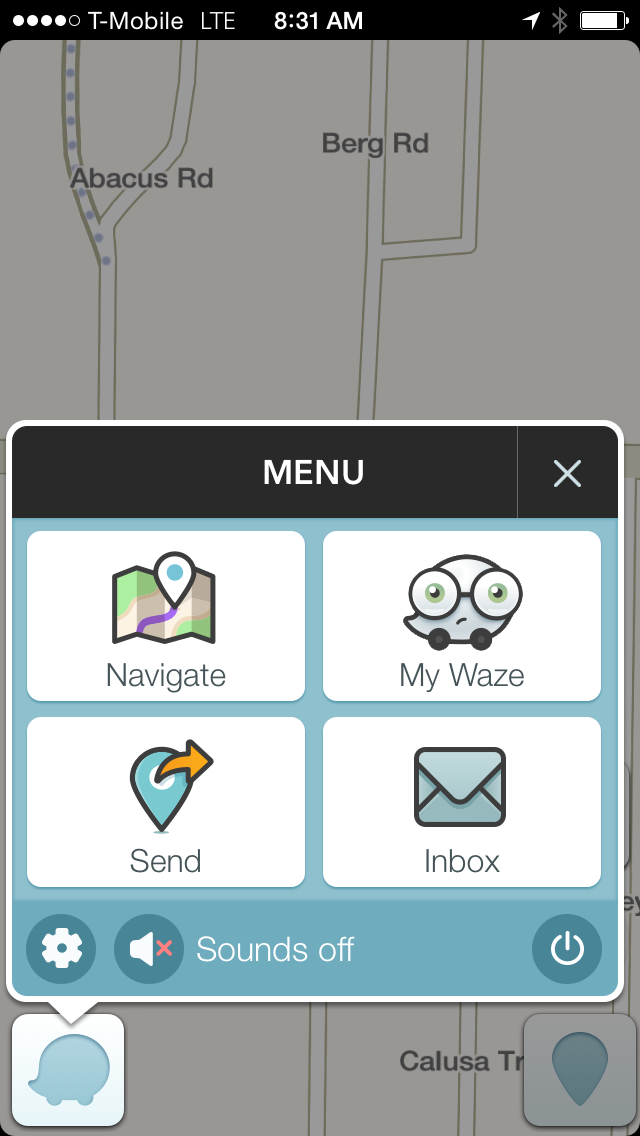
Users can choose what Waze icon that they display to the world. It also shows up on the menu where it says "My Waze" it displays the icon you chose. I chose "Nerdy". I highly recommend this app but I will point out a few things that may or may not bother users. There are pop-up ads sometimes when you stop at a stop light; these ads are for movies, restaurants, or banks. You can choose what language / voice gives you directions but I didn't find any that I found particularly pleasant so I turned voice directions off. Also a neat thing is that it will give you directions with the phone closed / locked if you have to save battery life or something. The app notices when you are moving and unless you notify it that you are the passenger it will not allow you to type anything while you are moving.
If you want to learn more or get a link to download the app checkout their website: https://www.waze.com/
Friday, July 24, 2015
Learn Computer Programming
Code.org
– This nonprofit foundation website
is a great starting point for coding novices. It shares lots of useful online
resources, apps and even local schools for
learning coding. There are materials that are appropriate for children from
early elementary through high school. There are even adults that use these
resources to learn Python and JavaScript.
Scratch – Designed by MIT students and aimed at children ages 8 to 16, this easy-to-use programming language lets kids build almost anything they can dream up. No crazy lines of code here. Instead you arrange and snap together Scratch blocks as if they were virtual Legos. It seems simple but it can get very complicated and you can do a lot more with it then you might think.
Stencyl – Inspired by Scratch's snapping blocks system, this software lets users create simple games for iOS, Android, Flash, Windows, Linux and Mac. Users have to down load their development environment software. If you or your child is serious about coding / programming, there are paid pro plans that come with advanced lessons.
Khan Academy – Known for its extensive and challenging math games, Khan Academy also has basic programming tutorials.
Code Academy – This interactive website is very user-friendly and teaches all users how to code through fun and simple exercises that feel like games. I will say from personal experience that it is very picky on the code, you can write some lines of code that do exactly what they are asking but if it isn't exactly like the website expects it will tell you that you didn't do it correctly.
Hackety Hack – After a quick download to your computer, kids can learn Ruby, an open-source programming language that's easy and intuitive.
Code Monster – Particularly good for kids, Code Monster features two adjacent boxes. One displays code, the other shows what the code does. As you play around with the code with some help from a prompt, you learn what each command does.
Apps to Learn to Code and/or program:
Cargobot (Free. iPad only) For ages 8 and up it teaches logic, sequencing, and some basic ideas of how to create commands but not actual "code". It is fun and tough, I wish it better explained what it is trying to teach because although it is teaching through gameplay it could be clearer and straight forward in "this is the best way to do this because..." type stuff.
Kodable (Free - 6.99 iPad only) The company that created Kodable has a full curriculum for parents and educators to teach elementary school children programming concepts. Receiving high marks from reviewers it has activities and teachable moments that reinforce lessons from the app offline (real world). The first lesson is free but additional lessons are 6.99. Pricing for curriculum depends on the number of students and educators.
Lightbot Jr. (1.99 iOS, Android, and Amazon) Ages 4 to 8 Teaches writing code snippets and put them in an order to execute basic commands, they refer to them as coding puzzles.
Lightbot (1.99 iOS, Mac, Android, Amazon, and Windows) For ages 9 and up this game app teaches programming through puzzles that help users understand concepts required for creating a program.
Move the Turtle (3.99 iOS only) Teaches ages 9 and up programming concepts: loops, procedures, variables and conditional functions. Allows users to learn creating and manipulating graphics, spatial orientation, and programming sound. Provides additional inspirational examples they can try to duplicate or edit.
L2Code CSS (2.99 iOS, Android, Amazon) Aimed at adults teaches users HTML and CSS basics through short easy to follow lessons. Examples help you see what you should do or what you are doing wrong.
Codea (9.99 iOS only) Used as a mobile environment for writing X code used to create Mac and iOS apps. It doesn't teach programming but allows users to write code on their mobile device, transfer to other devices, or share with others.
Tynker (Free. iPad only) Use problem solving skills to play a game that uses drag and drop blocks of code. The website has a platform for schools and educators, along with resources for children www.tynker.com
Bee-bot (Free. iOS only) The app is based on a floor robot by the same name and it uses the robot’s keypad functionality. The app enables children to improve their skills in directional language and sequencing.
ScratchKids Lite (Free. iOS only) The app has a series of videos arranged by type of coding activity the user is trying to accomplish in Scratch. It gives nice step by step instructions.
Scratch – Designed by MIT students and aimed at children ages 8 to 16, this easy-to-use programming language lets kids build almost anything they can dream up. No crazy lines of code here. Instead you arrange and snap together Scratch blocks as if they were virtual Legos. It seems simple but it can get very complicated and you can do a lot more with it then you might think.
Stencyl – Inspired by Scratch's snapping blocks system, this software lets users create simple games for iOS, Android, Flash, Windows, Linux and Mac. Users have to down load their development environment software. If you or your child is serious about coding / programming, there are paid pro plans that come with advanced lessons.
Khan Academy – Known for its extensive and challenging math games, Khan Academy also has basic programming tutorials.
Code Academy – This interactive website is very user-friendly and teaches all users how to code through fun and simple exercises that feel like games. I will say from personal experience that it is very picky on the code, you can write some lines of code that do exactly what they are asking but if it isn't exactly like the website expects it will tell you that you didn't do it correctly.
Hackety Hack – After a quick download to your computer, kids can learn Ruby, an open-source programming language that's easy and intuitive.
Code Monster – Particularly good for kids, Code Monster features two adjacent boxes. One displays code, the other shows what the code does. As you play around with the code with some help from a prompt, you learn what each command does.
Apps to Learn to Code and/or program:
Daisy the
Dinosaur (Free. iPad only) This app is good for children 7 and up. It is really
teaches more beginning logic and sequencing, not really programming or
even coding, but it is a good start.
Cato's Hike: A Programming and Logic Odyssey (4.99 iOS
only) Cute story based adventures takes users on a journey collecting hearts
and stars. The lessons are basic logic and sequencing but not really writing
any code or assembling snippets of code. A nice game to prepare children 8 and
up for Scratch.
Hopscotch (Free. iPad only) Target ages 10
and above it teaches sequence and logic but not a lot of
"code". It has great colors, a great interface, and can
become challenging (even for adults).
Cargobot (Free. iPad only) For ages 8 and up it teaches logic, sequencing, and some basic ideas of how to create commands but not actual "code". It is fun and tough, I wish it better explained what it is trying to teach because although it is teaching through gameplay it could be clearer and straight forward in "this is the best way to do this because..." type stuff.
Kodable (Free - 6.99 iPad only) The company that created Kodable has a full curriculum for parents and educators to teach elementary school children programming concepts. Receiving high marks from reviewers it has activities and teachable moments that reinforce lessons from the app offline (real world). The first lesson is free but additional lessons are 6.99. Pricing for curriculum depends on the number of students and educators.
Lightbot Jr. (1.99 iOS, Android, and Amazon) Ages 4 to 8 Teaches writing code snippets and put them in an order to execute basic commands, they refer to them as coding puzzles.
Lightbot (1.99 iOS, Mac, Android, Amazon, and Windows) For ages 9 and up this game app teaches programming through puzzles that help users understand concepts required for creating a program.
Move the Turtle (3.99 iOS only) Teaches ages 9 and up programming concepts: loops, procedures, variables and conditional functions. Allows users to learn creating and manipulating graphics, spatial orientation, and programming sound. Provides additional inspirational examples they can try to duplicate or edit.
L2Code CSS (2.99 iOS, Android, Amazon) Aimed at adults teaches users HTML and CSS basics through short easy to follow lessons. Examples help you see what you should do or what you are doing wrong.
Codea (9.99 iOS only) Used as a mobile environment for writing X code used to create Mac and iOS apps. It doesn't teach programming but allows users to write code on their mobile device, transfer to other devices, or share with others.
Tynker (Free. iPad only) Use problem solving skills to play a game that uses drag and drop blocks of code. The website has a platform for schools and educators, along with resources for children www.tynker.com
Bee-bot (Free. iOS only) The app is based on a floor robot by the same name and it uses the robot’s keypad functionality. The app enables children to improve their skills in directional language and sequencing.
ScratchKids Lite (Free. iOS only) The app has a series of videos arranged by type of coding activity the user is trying to accomplish in Scratch. It gives nice step by step instructions.
Free Web
resources for learning how to code:
A new website created by Facebook that has a lot of resources to learn programming:
https://techprep.fb.com
A new website created by Facebook that has a lot of resources to learn programming:
https://techprep.fb.com
Very basic to intermediate: http://code.org/learn
C# and .Net languages (beginner to advanced) http://asciiwarriors.com/resources
College level classes: https://www.coursera.org/courses
and http://www.oeconsortium.org/courses/category/2717/
An assortment of languages (beginner to advanced): http://www.tutorialspoint.com/computer_programming_tutorials.htm
Learning HTML, CSS, and Java Script: http://www.w3schools.com/
To practice / work on projects: www.programmr.com
Learn to program for Android: http://www.vogella.com/tutorials/Android/article.html
Online Java Compiler:
https://ideone.com/
Monday, July 20, 2015
Keeping your Computer Safe
Two of the things that I am
asked about a lot is “what can I do to make my computer faster” and “how can I
protect my computer from viruses”. Below I am going to give you some advice for
both of these and if you want to learn more I have given you links to articles
that will give you more information. Knowing what scams and malicious actors are
doing is a form of protection that I highly recommend, the old adage “knowledge
is power” and “prevention is the best protection” come to
mind.
One of the websites that I
frequently read is called Krebs on Security http://krebsonsecurity.com/
and it is by a Internet Security expert Brian Krebs. He has three rules that I
have passed on as mantra, “1) If you didn’t go looking for it, don’t install it;
2) If you installed, update it. 3) If you no longer need it, get rid of it!”.
To read more about the three rules and why they are so important check out this
article: http://krebsonsecurity.com/2011/05/krebss-3-basic-rules-for-online-safety/
One of the software he
recommends (and I use) is File Hippo’s App Manager http://www.filehippo.com/download_app_manager
it let’s you know what programs on your computer need to be updated and will
update them for you if you choose.
Cleaning off temporary
files, deleting cookies, and fixing registry mistakes will make speed up your
computer and get rid of records of your web activity so that websites can not
view / collect that data. The program that I recommend to do this (again I use
it) is CC Cleaner http://filehippo.com/download_ccleaner/
. People ask about defragging their computer, most computers do this
automatically now but if you’d like to learn more I recommend this article
http://lifehacker.com/5976424/what-is-defragging-and-do-i-need-to-do-it-to-my-computer
To get rid of malware,
adware, and certain types of bloatware I would recommend Malwarebytes (again I
use this program myself) https://www.malwarebytes.org/mwb-download/
People ask me about
installing a firewall, most computers have a built-in firewall. If you have a PC
running Windows you can look at your firewall settings by going to the “Control
Panel” and selecting “System and Security” {Windows 7} or “Microsoft Firewall”
{Windows 8}.
Windows 8 computers also
have an antivirus program pre-installed called “Windows Defender”. If you do not
have that version of Windows or if you want a different antivirus there are a
lot of free programs that work very well. This article lists several different
good choices http://krebsonsecurity.com/tools-for-a-safer-pc/
. If you feel that you would like the added features or need a paid version buy
it from a store or online; do not choose auto renewal because many companies
charge more for renewals than to just buy a new program (besides they may not be
the best for you the next year).
JavaScript and Adobe Flash
allow for added functionality but they can also be holes that allow for
malicious programs and hackers to exploit. There are extensions that you can
install that will give you more control over when a website uses JavaScript or
Flash, they are discussed in the “Tools For a Safer PC” article linked above. If
you are very worried about it you can go to your settings menu in Chrome under
privacy you can turn off JavaScript and “prompt you for when to use
plugins”.
Another great article about
what to do if you have a virus written by Malwarebytes is available here:
https://goo.gl/0XYVT1
. If you have something like ransomware or there is a malicious program that you
cannot clean with the above mentioned articles, your best bet is to find a
reputable local computer repair business to thoroughly clean your
computer.
Friday, June 26, 2015
Every Hero Has a Game App
There are a lot of really
cool Superhero game apps. The ones I reviewed below are just a few that I
thought were really good, if you would like a longer list there is a website www.superherogame.org/mobile and
although all these apps are "free" there are in game purchases available so make
sure you (or people you suggest these to) have the settings on their device
prompt "password for purchases".
Flappy Superhero (Free.
iOS and Android) If you have never played Flappy Birds.... maybe you are better
off. It is an extremely simple game that for some reason is incredibly hard. You
tap the screen and your bird (or in this case superhero) goes up and if you
don't tap he goes down. The goal is to pass through as many obstacles as
possible. As you get further you have more superheroes and backgrounds to choose
from. Appropriate for all ages (but may not be safe from someone who gets
annoyed by games and might throw a device.)
Spiderman Unlimited
(Free. iOS and Android) Fun game that reminds me of Temple Run and other games
where you run, jump, and slide. The graphics style is comic book and it has a
good story that ties it all together. I think this might be good for kids third
grade and up.
Marvel Puzzle Quest
(Free. iOS and Android) This game combines a Jewel Quest or Candy Crush type
puzzle game with a superheroes fighting bad guys overarching story. To power-up
your heroes you have to connect certain colors and to disable bad guys you have
to eliminate certain colors. No actual violence so I'd say this is appropriate
for second or third grade and up.
Injustice: Gods Among Us
(Free. iOS and Android) A fighting game much like its predecessors "Street
Fighter" or "Mortal Kombat". Your team is made up of three superheroes or
villains and they fight another three. The idea is that you use blocking,
combinations, special moves, and timing to defeat your opponents. As you win,
the game unlocks new characters and special powers. It isn't bloody or gory but
the almost higher-level violence may make it more appropriate for late middle
school or even high school age youth.
Marvel Contest of
Champions (Free. iOS and Android) Another fighting game, this time
one on one, but less violent so it may be appropriate for older elementary school aged children. It has online game play where you can talk to
other people playing the game, players do not need to use this feature but it
may allow them the opportunity to unlock certain bonus items and play in
tournaments. Unfortunately the game cannot be played without being connected to
the Internet which can mean the use of a lot of data if you are not connected to
Wi-Fi. The story, graphics, game play, and options make this a fun and addictive
game. It has won multiple mobile app and mobile gaming awards.
Monday, June 22, 2015
Superhero Apps
Which Superhero Are You (Free. iOS and Android) I'd like
to first point out that the Android and Apple versions do the same ting
but are from different companies. The Android version has better
graphics and includes villains. What you can do is pick a superhero in
your head, answer questions, and see if it guesses correctly. The other
use is to answer the questions about yourself and see what superhero (or
villain) you are most like. It's cute and appropriate for all ages.
Super Hero Photo Quiz (Free. iOS only) If you are a comic book, anime, and manga master this is the app for you. It shows a picture of a character and you try to answer their name. You can get help but it costs coins, which you are awarded with correct answers, watch ads, write a review of the app, share on Facebook, or purchase. Users might get frustrated and give up quickly or they will really like it.
Comic Book Trivia (Free. Android Only). Test your knowledge of comic book characters. Multiple choice questions that have varying degrees of difficulty. Many reviewers complain that it focuses too heavily on DC and Marvel.
POW (Free. iOS only) A cute app that makes silly superhero sounds (think 60's Batman) when you punch your phone in the air. It can be a quick workout, relieve stress, or in my case annoy the coworkers in the cubicle next to you. Little kids may find it fun and funny. They app was glitch and froze a couple times, so it has some flaws.
Superhero Comic Book Maker ($1.99 iOS only) Create your own digital comics by using pre-made characters, effects, backgrounds, and speech bubbles. You can record your own voice, use 29 different crayons, and animate panels. It seems really aimed at 6 - 12 year old kids. http://www.duckduckmoose.com/educational-iphone-itouch-apps-for-kids/superhero-comic-book-maker/
Comic Strip It! (Free or $1.99 pro version Android only) Create your own comic strips, comic books, memes, story boards, and quick how-to directions. You can share quickly with social media or save your creation. The Pro version gives a lot more tools / options and allows exporting as a digital comic book format.
Super Hero Photo Quiz (Free. iOS only) If you are a comic book, anime, and manga master this is the app for you. It shows a picture of a character and you try to answer their name. You can get help but it costs coins, which you are awarded with correct answers, watch ads, write a review of the app, share on Facebook, or purchase. Users might get frustrated and give up quickly or they will really like it.
Comic Book Trivia (Free. Android Only). Test your knowledge of comic book characters. Multiple choice questions that have varying degrees of difficulty. Many reviewers complain that it focuses too heavily on DC and Marvel.
POW (Free. iOS only) A cute app that makes silly superhero sounds (think 60's Batman) when you punch your phone in the air. It can be a quick workout, relieve stress, or in my case annoy the coworkers in the cubicle next to you. Little kids may find it fun and funny. They app was glitch and froze a couple times, so it has some flaws.
Superhero Comic Book Maker ($1.99 iOS only) Create your own digital comics by using pre-made characters, effects, backgrounds, and speech bubbles. You can record your own voice, use 29 different crayons, and animate panels. It seems really aimed at 6 - 12 year old kids. http://www.duckduckmoose.com/educational-iphone-itouch-apps-for-kids/superhero-comic-book-maker/
Comic Strip It! (Free or $1.99 pro version Android only) Create your own comic strips, comic books, memes, story boards, and quick how-to directions. You can share quickly with social media or save your creation. The Pro version gives a lot more tools / options and allows exporting as a digital comic book format.
Subscribe to:
Posts (Atom)