I had an article I was working on to disable notifications for Chrome but I can't find it.
Here are two articles that I found helpful:
How to Backup your iOS device on Your PC or Mac
https://www.nytimes.com/2017/08/18/technology/personaltech/finding-your-ipad-backup-files.html
20 Cool Command Line Tricks
http://fieldguide.gizmodo.com/20-cool-command-line-tricks-for-windows-and-macos-1797222311
Hopefully I will write something soon, just been super busy.
Friday, August 18, 2017

Friday, August 4, 2017
Better Wi-Fi Performance
Concerning Better Wi-Fi
- Update your firmware; with new routers this is really easy, you can navigate to your router's setting using an app or by going to 192.168.0.1 and then putting your credentials (hopefully they aren't default and if they are CHANGE THEM NOW!). In the setting there is usually a button to "update firmware". Some really nice routers do this for you automatically.
- Put your router some place open and if possible high up. This keeps the waves from being blocked by walls, furniture, and because of the design of most routers the waves travel downward.
- Use AES encryption and have friends use a guest network to limit privileges
- If possible schedule big downloads at non-peak times (like midnight or 2am)
- Reduce the number of items connected to the router. If you aren't using your cell phone, tablet, gaming box, etc and it has a Wi-Fi connection (sometimes by default) turn it off or disconnect it. I recently did this to my child's PS3 and Wii.
- Restart the router: have you tried turning it off and back on again. I know it is cliche but sometimes restarting the connection to your modem and refreshing the connections the router is making can help. I have found cycling both the modem and router is a really good refresh during peak times (dinner time / early evening when everyone is online).
- All else fails, maybe it is time for new equipment. I wrote this back in December 2016 but it was pretty thorough https://technologylibrarian.blogspot.com/2016/12/mesh-networks-amplifi-hd-eero-google-wi.html I recently recommended a new router to a coworker and they saw a vast improvement in their Wi-Fi performance.
I was inspired and took some information from this article: https://www.wired.com/story/how-to-make-your-wifi-better-faster
Monday, July 3, 2017
Death of an App
Sorry I haven't written in a while. I have been busy in a new job that has a lot going on.
Anyways, two of the apps that I reviewed and recommended have sent e-mails that they are closing up shop and will no longer provide service as of August.
These apps are Pact app and Heirloom.
I was a Pact app user for multiple years and I'm sad to see it go but I could see the writing on the wall as the weekly reward for completing healthy activities went below $2 a week to as low as $1.20 (I could be wrong but that's what I remember).
This isn't the first time that I have had a favorite app go away but I feel like app companies have done a much better job of communicating ahead of time to its users. They never really explain the "why" but I guess we can deduce that it is a lack of making money. I understand why they can't tell users the whole story but I'm sure some us would be interested.
In the past I have had apps that were bought up by other companies such as Sunrise Calendar by Microsoft. They use the technology in another one of the company's apps, in this case Outlook.
Losing an app that you really enjoy is kind of like having an acquaintance or coworker pass away. It's not the end of the world, just sucks.
I'm a bit worried about Evernote, they've been sending a lot more e-mails about their Premium features and they changed their paid features pricing about 9 months (that's a guess) ago.
Anyways, if you have an app that you lost. Tell me about it in the comments. If you have an idea about something to write about let me know.

Anyways, two of the apps that I reviewed and recommended have sent e-mails that they are closing up shop and will no longer provide service as of August.
These apps are Pact app and Heirloom.
I was a Pact app user for multiple years and I'm sad to see it go but I could see the writing on the wall as the weekly reward for completing healthy activities went below $2 a week to as low as $1.20 (I could be wrong but that's what I remember).
This isn't the first time that I have had a favorite app go away but I feel like app companies have done a much better job of communicating ahead of time to its users. They never really explain the "why" but I guess we can deduce that it is a lack of making money. I understand why they can't tell users the whole story but I'm sure some us would be interested.
In the past I have had apps that were bought up by other companies such as Sunrise Calendar by Microsoft. They use the technology in another one of the company's apps, in this case Outlook.
Losing an app that you really enjoy is kind of like having an acquaintance or coworker pass away. It's not the end of the world, just sucks.
I'm a bit worried about Evernote, they've been sending a lot more e-mails about their Premium features and they changed their paid features pricing about 9 months (that's a guess) ago.
Anyways, if you have an app that you lost. Tell me about it in the comments. If you have an idea about something to write about let me know.
Friday, May 12, 2017
Searching text on your mobile device
A lot of people are familiar with searching for a keyword in a text document on a desktop / laptop. You use Ctrl+F for (PC) or Command+F (Mac). This helps so much on long documents.
Did you know that you can do the same thing on a mobile device?
I am going to show you how on Chrome and Safari.
Step 1 Chrome
First tap the Menu button, it looks like three dots in the top right corner


Step 1 Safari
Tap on the Share button, it looks like a box with an arrow coming out of it


Did you know that you can do the same thing on a mobile device?
I am going to show you how on Chrome and Safari.
Step 1 Chrome
First tap the Menu button, it looks like three dots in the top right corner

Step 2
Tap on "Find in Page" now I found that many sites did not have this feature so I tapped "Request Desktop Site" (in green) and then it would allow me to select "Find in Page"

Then type in the box what you are looking for

Step 1 Safari
Tap on the Share button, it looks like a box with an arrow coming out of it

Step 2
Select the Magnifying Glass icon. You may have to slide the icons from right to left because it was further along on my version of the browser.

Step 3
Type what you want to search

That's it, I'm thinking about talking about passwords next time. NIST (National Institure for Standards and Technology) just updated their recommendations plus there is a lot of advice that I used to give people when I taught technology classes.
Wednesday, April 12, 2017
Cut The Cord
I did a program a while back on how to get rid of cable and switch to streaming alternatives.
Listed below are some hardware, streaming services, and other resources to help give those looking for alternatives several options.
Over the Air Resources:
Antennae Selection: https://www.channelmaster.com/Antenna-Selection- a/134.htm
Channel Position: http://www.overtheairdigitaltv.com/tv-station- locator-tool/
Devices:
Apple TV - https://www.apple.com/tv/
Fire TV - https://goo.gl/NMHliy
Google Chromecast - https://goo.gl/uxfPNk
Roku - https://www.roku.com/products/compare#
Kodi Box - https://goo.gl/yg7hFs (prosecution of a seller in UK https://goo.gl/DTuPo7 )
Blu Ray players, Gaming Devices, Tablets, Smart Phones
Air TV - https://goo.gl/NTiZxQ
Sling Box - http://www.slingbox.com
Services:
Amazon –https://goo.gl/uy5OHT
Direct TV Now* - https://directvnow.com
Hulu – https://www.hulu.com
Netflix – https://www.netflix.com
Sling TV* – https://www.sling.com
Playstation Vue* - https://vue.playstation.com
*Each Sport Has Special Streaming as well.
Free Services:
Crackle - http://www.crackle.com/
Hoopla – http://www.hoopladigital.com
In the News:
The NVDIA Shield https://goo.gl/5Z31cZ
Caavo System allows you to watch via multiple devices https://goo.gl/HtqjBP
Great place to learn more: http://www.cordkillers.com/
Listed below are some hardware, streaming services, and other resources to help give those looking for alternatives several options.
Over the Air Resources:
Antennae Selection: https://www.channelmaster.com/Antenna-Selection- a/134.htm
Channel Position: http://www.overtheairdigitaltv.com/tv-station- locator-tool/
Devices:
Apple TV - https://www.apple.com/tv/
Fire TV - https://goo.gl/NMHliy
Google Chromecast - https://goo.gl/uxfPNk
Roku - https://www.roku.com/products/compare#
Kodi Box - https://goo.gl/yg7hFs (prosecution of a seller in UK https://goo.gl/DTuPo7 )
Blu Ray players, Gaming Devices, Tablets, Smart Phones
Air TV - https://goo.gl/NTiZxQ
Sling Box - http://www.slingbox.com
Services:
Amazon –https://goo.gl/uy5OHT
Direct TV Now* - https://directvnow.com
Hulu – https://www.hulu.com
Netflix – https://www.netflix.com
Sling TV* – https://www.sling.com
Playstation Vue* - https://vue.playstation.com
*Each Sport Has Special Streaming as well.
Free Services:
Crackle - http://www.crackle.com/
Hoopla – http://www.hoopladigital.com
In the News:
The NVDIA Shield https://goo.gl/5Z31cZ
Caavo System allows you to watch via multiple devices https://goo.gl/HtqjBP
Great place to learn more: http://www.cordkillers.com/
Saturday, March 18, 2017
Post Card Apps
I recently drove from Tampa, FL to Anchorage, AK. I wanted to send postcard of the pictures I took. So, I tried some different postcard apps.
 Ink - unfortunately I had so many problems trying to find postcards in the app. that I gave up and deleted it. It seems this app is more for personalized regular cards .

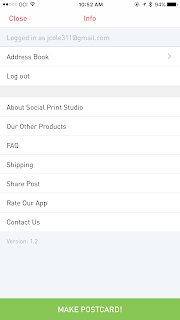 Post (Social Print Studio) - This app was easy to use and set-up. They make the payment portion extremely easy allowing users to use Apple Pay. They have nice templates, but their isn't much more users can do to customize the photo portion. The cost was $1.99 so not the least expensive but not out of the ball park. I believe the 4 by 6 is a good size. https://www.socialprintstudio.com/

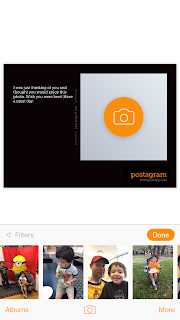 Postagram - I have used this app in the past because I believe it was one of the first. The app allows you one postcard for free. Then, it's .99 for each one and you can save if you buy in bulk. The PostgramPlus allows users to change the background for an additional charge. This type of thing annoys me, I'm already paying and the background choices aren't even very good. They have a cute feature where the picture on the postcard pops out so it can be saved independently. Unfortunately the picture on these cards are much smaller than other postcard apps. https://sincerely.com/postagram


Touchnote - I liked the templates and the ability to customize the picture portion. They have all these little add-ons that they want to charge for like special fonts. Again, I really don't like that and charging for things in "credits" where a credit equals $1.99 is annoying and LAME! Besides that the app does everything nicely: 4 by 6 post card, easy to use, and you can use a photo or graphic in the stamp's spot. https://sincerely.com/postagram
One of the things that I thought all of them handled well was payment, users can use Apple Pay or quickly add another payment method and it remembers the information. I have used a lot of apps where the sign up process and payment portion was a nightmare.
If you are really interested in a higher level of detail about these apps there is a far more in-depth article that I read here: https://www.dpreview.com/reviews/postcard-app-touchnote-postcard-postagram-ink-snapshot-postcard
So here are some of my favorite pictures from my trip to Alaska:



Touchnote - I liked the templates and the ability to customize the picture portion. They have all these little add-ons that they want to charge for like special fonts. Again, I really don't like that and charging for things in "credits" where a credit equals $1.99 is annoying and LAME! Besides that the app does everything nicely: 4 by 6 post card, easy to use, and you can use a photo or graphic in the stamp's spot. https://sincerely.com/postagram
One of the things that I thought all of them handled well was payment, users can use Apple Pay or quickly add another payment method and it remembers the information. I have used a lot of apps where the sign up process and payment portion was a nightmare.
If you are really interested in a higher level of detail about these apps there is a far more in-depth article that I read here: https://www.dpreview.com/reviews/postcard-app-touchnote-postcard-postagram-ink-snapshot-postcard
So here are some of my favorite pictures from my trip to Alaska:


Thursday, February 16, 2017
Tech News and Information
How did I come up with ideas for articles? Where do I get my technology news and information? I thought that I would give you a list of sources so that the curious could learn and maybe find a tool to help them in the future. When I am trying to come up with an idea for an article I listen to podcasts, look for a pattern in the tech news, read technology newsletters, or get ideas from readers.
Web Resources
Tech Meme - They aggregate technology news from multiple sources
Wired - I used to have a print subscription, now I have a digital subscription and use the website. They cover technology, science, trends, and how it impacts society.
New York Times Technology articles - I setup a recipe in IFTT (If This Then That) and I automatically get technology articles sent to my e-mail.
Nicole Hennig - she sends out a monthly newsletter that is aimed at Librarians. She has also written books, articles, and taught webinars. She is very smart, extremely talented, and I'm a little jealous. Her blog is a wealth of resources
These are all places that I check up for the latest articles on new technology, upcoming devices, computer programming, and the developments in the technology sector:
Engadget
Gizmodo
Hacker News
The Verge
Podcasts
Daily Tech News - first thing every weekday
Tech's Message - technology news with a UK perspective
Android App Arena - I watch when a category interests me
iOS Today - From time to time to hear app suggestions and Apple developments
This Week in Tech - To get a discussion about the week's biggest technology stories
This Week in Google - More of a discussion on the role of technology companies in our society, what is ahead for technology, just a little about Google
Exponent - a podcast that looks at the business and management side of the technology industry
Fixing I.T. and Programming Problems
You Tube - great how to videos
iFixit - Tools, tear aparts, how to, diagrams, and much more
Stack Overflow - coding, programming, and other insanity
Bleeping Computer - a community of I.T. people that have answers to problems
Web Resources
Tech Meme - They aggregate technology news from multiple sources
Wired - I used to have a print subscription, now I have a digital subscription and use the website. They cover technology, science, trends, and how it impacts society.
New York Times Technology articles - I setup a recipe in IFTT (If This Then That) and I automatically get technology articles sent to my e-mail.
Nicole Hennig - she sends out a monthly newsletter that is aimed at Librarians. She has also written books, articles, and taught webinars. She is very smart, extremely talented, and I'm a little jealous. Her blog is a wealth of resources
These are all places that I check up for the latest articles on new technology, upcoming devices, computer programming, and the developments in the technology sector:
Engadget
Gizmodo
Hacker News
The Verge
Podcasts
Daily Tech News - first thing every weekday
Tech's Message - technology news with a UK perspective
Android App Arena - I watch when a category interests me
iOS Today - From time to time to hear app suggestions and Apple developments
This Week in Tech - To get a discussion about the week's biggest technology stories
This Week in Google - More of a discussion on the role of technology companies in our society, what is ahead for technology, just a little about Google
Exponent - a podcast that looks at the business and management side of the technology industry
Fixing I.T. and Programming Problems
You Tube - great how to videos
iFixit - Tools, tear aparts, how to, diagrams, and much more
Stack Overflow - coding, programming, and other insanity
Bleeping Computer - a community of I.T. people that have answers to problems
Subscribe to:
Posts (Atom)